Desktop Client
WebDAV - Linux
Securely connect to Scramble Cloud via WebDAV – access, manage, and sync encrypted files using Explorer, Finder, Linux, or advanced tools like Rclone.
WebDAV (Web-based Distributed Authoring and Versioning) is a standardized protocol that enables remote file management over the internet. Scramble Cloud provides full WebDAV support through both the integrated desktop client and third-party tools like Rclone.
⚠️ Note: WebDAV can only be used with a Premium account. If you have a Freemium account, please use your browser for Scramble or upgrade your account to a monthly or lifetime subscription.
1. WebDAV Configuration in the Scramble Desktop Client
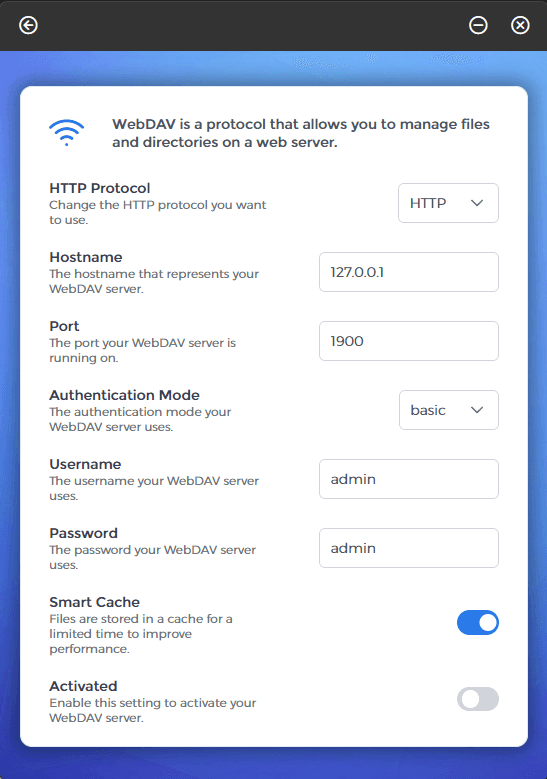
Within the Scramble Desktop Client, the following WebDAV settings are available:
- HTTP Protocol — Select the protocol to use: HTTP or HTTPS.
- Hostname — The address of the WebDAV server (e.g. 127.0.0.1).
- Port — The port on which the WebDAV service is accessible (e.g., 1900).
- Authentication Mode — Choose between:
basic– Sends username and password in plaintextdigest– Uses hashed credentials for increased security
- Username / Password — Enter the login credentials used for authentication.
- Smart Cache — Enables local caching of files to enhance performance.
- Activated — Enables the WebDAV service for the client.
2. Using WebDAV on Linux (GNOME / Nautilus)
- Open the File Manager
- Go to Connect to Server
- Enter the address:
- For HTTP:
http://127.0.0.1:1900/ - For HTTPS:
https://127.0.0.1:1900/
- For HTTP:
- Authenticate when prompted